Android App Entwicklung idoit
-
Hallo,
für mein Studium (Projektarbeit/Bachelorarbeit) habe ich die Aufgabe, eine Applikation für Android zu schreiben, mit der man auf die Datenbank i-doit zugreifen kann. Dies ist mein erstes Projekt im Bezug auf Android und JSON. Das Dokument mit der technischen Erläuterung der "i-doit JSON RPC API" hilft mir leider nur bedingt weiter. Ich versuche per HTTP Post auf die demo-Datenbank zuzugreifen, jedoch weiß ich nicht, in wiefern ich die params und den api-key bzw. Nick/PW einbinden soll. Ebenfalls weiß ich nicht, ob ich die richtige URL verwende, da ich ständig als Request-Objekt einen Text mit "400 Bad Request"-Nachricht bekomme.
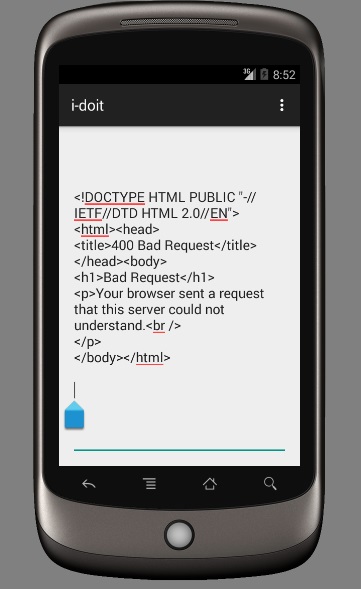
Folgendermaßen sieht mein Code aus:
@Override
protected void onCreate(Bundle savedInstanceState) {
        super.onCreate(savedInstanceState);
        setContentView(R.layout.activity_startscreen);

        //Aufruf der execute-Methode (Ist die übergebene URL  richtig?)
        new DownloadTextTask().execute("http://demo.i-doit.com/src/jsonrpc.php");
}

public InputStream OpenHttpPOSTConnection(String url){
        InputStream inputStream = null;
        HttpClient httpClient = new DefaultHttpClient();
        try{

            HttpPost httpPost = new HttpPost(url);

            // HTTP Post Header (Was muss alles per Header mitgegeben werden und stimmt die URL?)
            httpPost.addHeader("Host","http://demo.i-doit.com/src/jsonrpc.php");
            httpPost.addHeader("Content-Type", "application/json-rpc");
            httpPost.addHeader("X-RPC-Auth-Username","admin");
            httpPost.addHeader("X-RPC-Auth-Password","admin");

            // JSON Objekt mit Schlüsselwertpaaren (Sind die SWP vollständig und korrekt?)
            JSONObject json = new JSONObject();
            HashMap <string, string="">map = new HashMap();
            map.put("apikey","c1ia5q");
            map.put("objID","4438");
            map.put("catgID", "41");
            json.put("method","cmdb.category");
            json.put("version","2.0");
            json.put("id","1");
            json.put("params",map);

            // JSON Objekt an HTTP Post übergeben
            StringEntity params =new StringEntity(json.toString());
            httpPost.setEntity(params);

            HttpResponse httpResponse = httpClient.execute(httpPost);
            inputStream = httpResponse.getEntity().getContent();

        }catch(Exception e){
            Log.d("OpenHttpPOSTConnection", e.getLocalizedMessage());
        }finally {
            httpClient.getConnectionManager().shutdown();
        }
        return inputStream;
    }

    private String DownloadText(String URL){
        int BUFFER_SIZE = 2000;
        InputStream in = null;
        try{
            in = OpenHttpPOSTConnection(URL);
        }catch (Exception e){
            Log.d("Networking", e.getLocalizedMessage());
            return "";
        }

        InputStreamReader isr = new InputStreamReader(in);
        int charRead;
        String str = "";
        char[] inputBuffer = new char[BUFFER_SIZE];
        try{
            while ((charRead = isr.read(inputBuffer))>0){
                String readString = String.copyValueOf(inputBuffer, 0, charRead);
                str += readString;
                inputBuffer = new char[BUFFER_SIZE];
            }
            in.close();
        }catch (IOException e){
            Log.d("DownloadText", e.getLocalizedMessage());
            return "";
        }
        return str;
    }

    private class DownloadTextTask extends AsyncTask<string, void,="" string="">{
        protected String doInBackground(String... urls){
            return DownloadText(urls[0]);
        }

        @Override
        protected void onPostExecute(String result) {
            // Ausgabe des JSON-Objekts vom Server als String im Textfeld der Android-App
            EditText editText = (EditText)findViewById(R.id.editText_output);
            editText.setText(result);
        }
    }</string,></string,>
Ich wäre sehr dankbar, wenn mir jemand zeigen könnte, wo meine Fehler liegen.
Hello! It looks like you're interested in this conversation, but you don't have an account yet.
Getting fed up of having to scroll through the same posts each visit? When you register for an account, you'll always come back to exactly where you were before, and choose to be notified of new replies (either via email, or push notification). You'll also be able to save bookmarks and upvote posts to show your appreciation to other community members.
With your input, this post could be even better 💗
Register Login