[GELÖST]Darstellung nach Installation
-
Servus!
wollte mir mal i-doit anschauen und hab es zu Testzwecken auf meinem ubuntu webserver installiert.
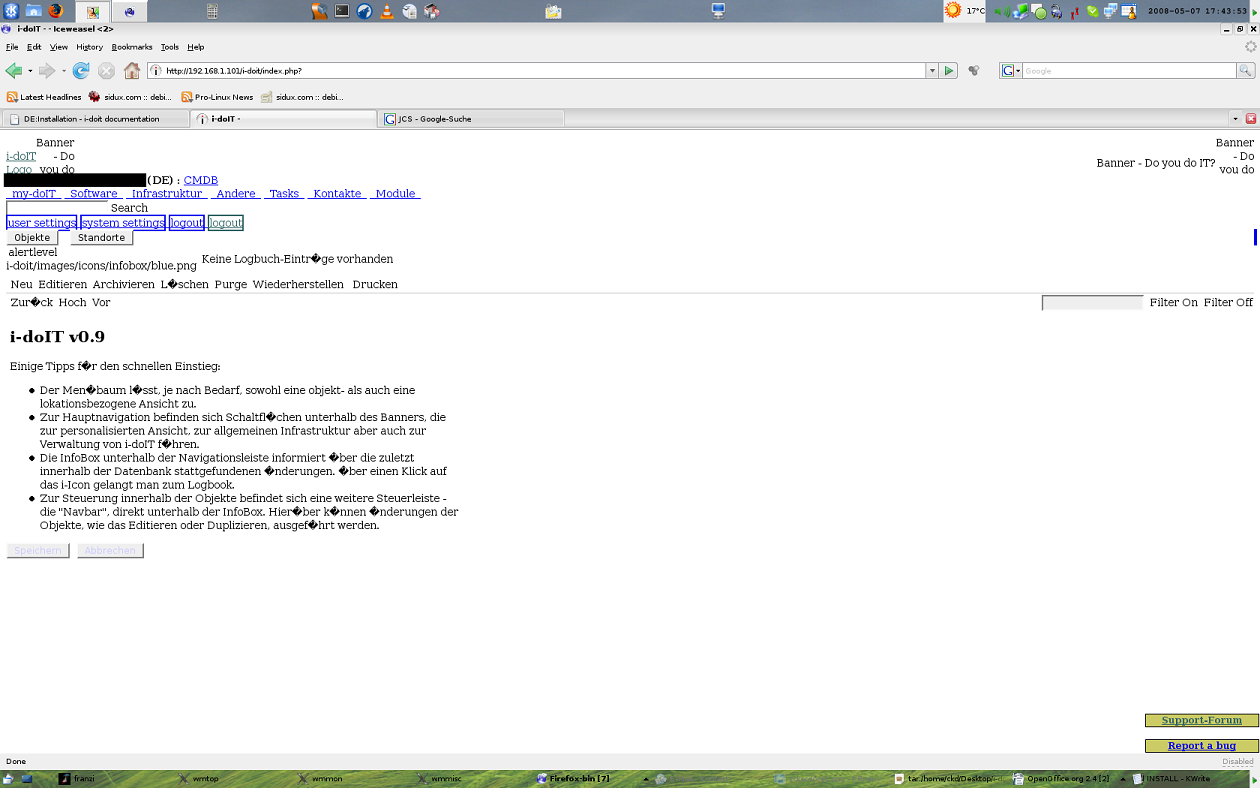
so schaut das ergebniss aus
was kannich tun? hab schon gesucht, aber nichts eindeutiges finden können.gruß loki
-
Du hast in der Konfigurationsdatei: src/config.inc.php das www_dir vermutlich falsch eingetragen. Es sollte in deinem Fall auf "www_dir" => "/i-doit/" stehen.
Da du einen Linux-Server hast solltest du auch die Rechte für die Cache Verzeichnisse überprüfen. Hierzu kannst du das mitgelieferte Script "./idoit-rights.sh unset" verwenden.Nach dem Ändern der config und setzen der Rechte müssen die Verzeichnisse einmal geleert werden: http://idoit-server/?IDOIT_DELETE_TEMP
-
Achso, bzgl. der kaputten Umlaute in dem screen musst du in der Apache config (/etc/apache2.conf) das defaultcharset auf iso-8859-15 setzen (AddDefaultCharset ISO-8859-15)
Ich würde Dir aber auch empfehlen, auf die neuste Version zu wechseln: http://i-doit.org/de/downloads , da die Version 0.9 noch sehr Buggy war
-
super jetut geht es, da stand nur "www_dir" => "i-doit" und nicht "www_dir" => "/i-doit/"
vielen dank

Hello! It looks like you're interested in this conversation, but you don't have an account yet.
Getting fed up of having to scroll through the same posts each visit? When you register for an account, you'll always come back to exactly where you were before, and choose to be notified of new replies (either via email, or push notification). You'll also be able to save bookmarks and upvote posts to show your appreciation to other community members.
With your input, this post could be even better 💗
Register Login