JSON-RPC: Patchpanel Ports anlegen
-
Hallo,
ich versuche komplette Patchpanels per JSON-RPC (in Python) zu erzeugen.
Mein Verständnis dazu ist das man dafür drei Schritte benötigt:- Patchfeld erstellen
- Ein-/Ausgangsports erstellen
- Ein-/Ausgänge miteinander verknüpfen
Das Patchfeld erstellen funktioniert soweit, aber ich habe das Problem das alle Ports die erstellt werden immer nur Ausgänge sind und sich auch nicht hinterher auf Eingänge ändern lassen.
Der Request sollte in ungefähr so aussehen (ist im Code über 2-3 Methoden verteilt..):
 data = {
        'id': 1,
        'version': '2.0',
        'method': cmdb.category.save,
        'params': {
            'apikey': self.apikey,
            'language': self.language,
            'object': obj_id,
            'category': 'C__CATG__CONNECTOR',
            'data': {
                'connection_type': {'const': 'C__CONNECTION_TYPE__RJ45',
                                    'title': 'RJ-45',
                                    'title_lang': 'RJ-45'},
                'title': 'P23',
                'type': {'const': '', 'id': '1', 'title': 'Eingang', 'title_lang': 'Eingang'} }
        },
    }
Mit dem Datensatz wird der Connector zwar erstellt, aber bei der Abfrage hinterher bekomme ich immer:
'type': {'const': '', 'id': '2', 'title': 'Ausgang', 'title_lang': 'Ausgang'} }Was ist hier der richtige Weg um einen 'Eingang' zu erstellen?
Gibt es evtl. einen anderen Weg direkt zwei miteinander verknüpfte Connectoren (Eingang+Ausgang) zu erstellen? -
Hallo @uhe,
nachdem ein Anschluss erstellt wurde, muss bei der Erstellung des 2. Anschlusses der Key:
connector_siblingverwendet werden.
Das würde so aussehen.
Ich erstelle eine Objekt mit Kategoriedaten:{ "id": 1, "version": "2.0", "method": "cmdb.object.create", "params": { "type": "C__OBJTYPE__PATCH_PANEL", "title": "PatchPanel-1", "categories": { "C__CATG__IP": [ { "ipv4_address": "11.11.0.123", "hostname": "PatchPanel-1", "domain": "", "primary": 1, "ipv4_assignment": 2, "active": 1 } ], "C__CATG__CONNECTOR": [ { "title": "Port-01/01 Eingang", "type": 1, "connection_type": 1, "interface": 1, "description": "My descr" } ] }, "apikey": "h3md6u3y", "language": "en" } }Das sieht in der GUI so aus:
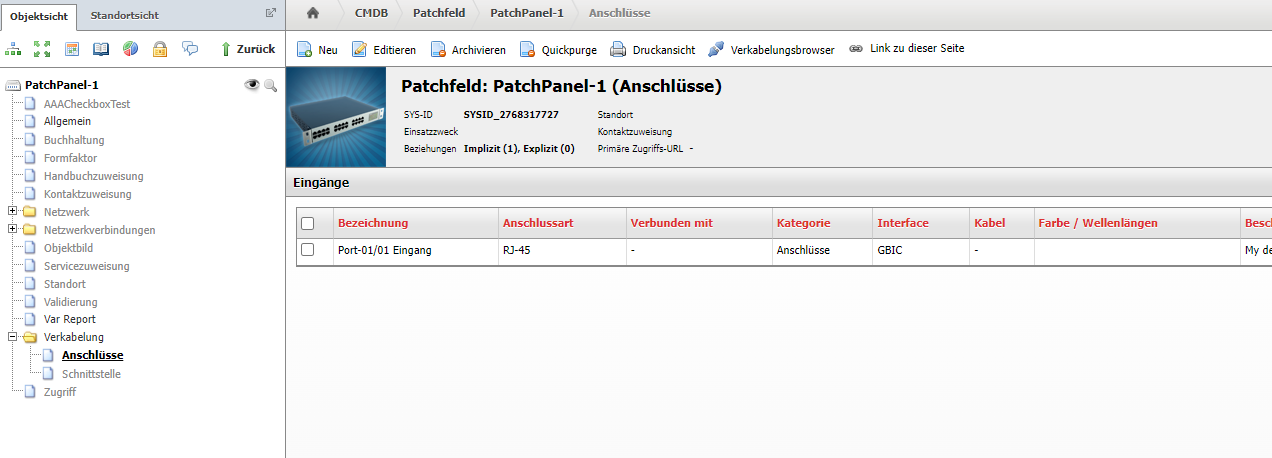
So nun erstelle ich den Ausgang, dazu verwende ich die Entry ID vom Eingang als ID für den sibling:{ "version": "2.0", "method": "cmdb.category.save", "params": { "object": 1122702179, "apikey": "h3md6u3y", "language": "en", "category": "C__CATG__CONNECTOR", "data": { "title": "Port-01/01 Ausgang", "type": 2, "connection_type": 1, "interface": 1, "connector_sibling": 87734, "description": "My descr" } }, "id": 2 }Nun wieder in der GUI:

Das sollte dir helfen.

Hello! It looks like you're interested in this conversation, but you don't have an account yet.
Getting fed up of having to scroll through the same posts each visit? When you register for an account, you'll always come back to exactly where you were before, and choose to be notified of new replies (either via email, or push notification). You'll also be able to save bookmarks and upvote posts to show your appreciation to other community members.
With your input, this post could be even better 💗
Register Login