Multi-Tenant i-doit Pro: Standortbaum und Arbeitsplatz-Zuweisung
-
Hallo zusammen,
ich habe i-doit Pro als Multi-Tenant-Installation eingerichtet. In Mandant 1 kann ich den Arbeitsplätzen als einen Standort zuweisen, aber in Mandant 2 kann ich die Standorte nur als Räumen zuweisen.
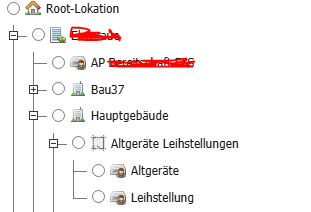
 Screenshot 1 – In Mandant 1 wird die Standortauswahl bis zum Arbeitsplatz angezeigt.
 Screenshot 2 – In Mandant 2 geht der Standortbaum nur bis zum Raum.
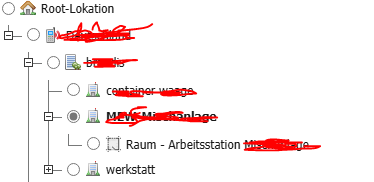
Ich bin als Admin angemeldet, aber wie gesagt, in Mandant 1 sehe ich Arbeitsplätze in der Standortauswahl, während in Mandant 2 der Standortbaum nur bis zu den Räumen reicht.Die gewünschte Struktur für beide Mandanten ist:
Root-Standort
├── Land
│ ├── Gebäude
│ │ ├── Raum
│ │ │ ├── ArbeitsplatzAber bei Drucker z. B. funktioniert. Ich kann einen Drucker direkt an einen Arbeitsplatz als Standort zuweisen
Meine Fragen:
Gibt es eine Einstellung, die die Tiefe des Standortbaums steuert?
Muss ich eine spezielle Option aktivieren, damit Clients Arbeitsplätze als Standort zugewiesen bekommen?Danke für eure Hilfe!
-
@mzaidan ich habe diese behoben. Das Problem war, dass der Objekttyp "Arbeitsplatz" kein Standortmerkmal hat.
Hello! It looks like you're interested in this conversation, but you don't have an account yet.
Getting fed up of having to scroll through the same posts each visit? When you register for an account, you'll always come back to exactly where you were before, and choose to be notified of new replies (either via email, or push notification). You'll also be able to save bookmarks and upvote posts to show your appreciation to other community members.
With your input, this post could be even better 💗
Register Login