Export
-
-English Below-
Hallo,
ich möchte gerne aufgrund von Automatisierung alle Elemente exportieren. In der Knowledge-Base finde ich jedoch nicht die passende Information, außer, dass ich die einzelnen Objekttypen einzeln importieren könnte. Das ist natürlich möglich aber, meiner Meinung nach, sollte das auch besser gehen.
Kann ich also alle Elemente gleichzeitig exportieren?-EN-
Hello,
due to Automation I want to export all Objects with their Object ID, yet I don't know hot to manage this. I only know how to export one specific Object-Type. -
Hallo,
wenn du die pro-Version verwendest, kannst du den Report Manager bzw. den Abfrage Editor dafür verwenden und das Ergebnis beispielsweise als CSV exportieren.
Liebe Grüße
Christian -
@creiss
Hallo!
Danke. Ich verwende aber i-doit open, dementsprechend muss ich es also einzeln machen? -
Hallo @serj-0,
du kannst die Objekte über "selected objects only" exportieren. Über die Lupe kommst du in die Auswahl, links kannst du dann "Search" auswählen und mit drei %-Zeichen (%%%) suchen. Damit solltest du alle Objekte finden und im Anschluss exportieren können.
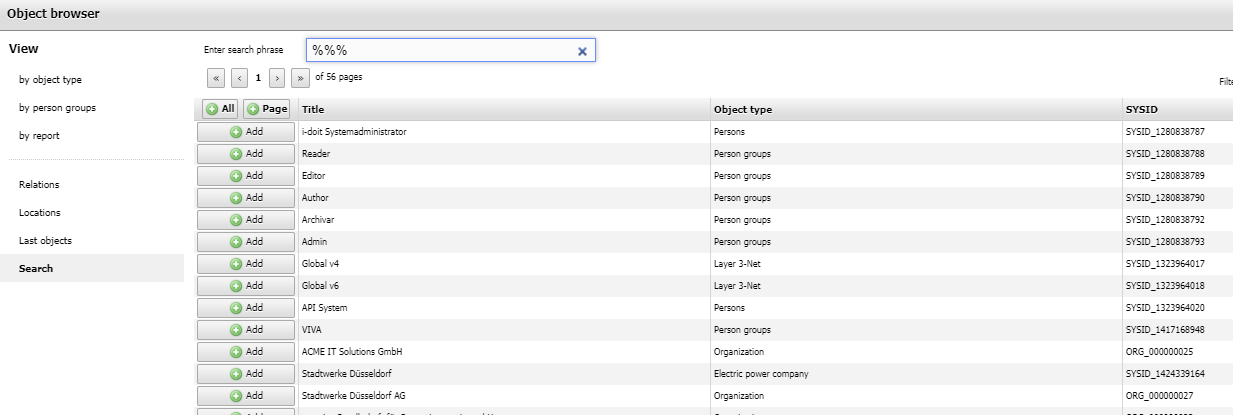
Liebe Grüße
Christian

Hello! It looks like you're interested in this conversation, but you don't have an account yet.
Getting fed up of having to scroll through the same posts each visit? When you register for an account, you'll always come back to exactly where you were before, and choose to be notified of new replies (either via email, or push notification). You'll also be able to save bookmarks and upvote posts to show your appreciation to other community members.
With your input, this post could be even better 💗
Register Login