CMDB i-doit not running after updating PHP to 7.3
-
Hello All;
I have installed and tested i-doit CMDB application in my VPS but after updating the PHP version to 7.3.18 the application is not running and i have a error log that tell me :
php7:error] [pid 20830] [client x.x.x.x:53176] PHP Fatal error: Uncaught Error: Call to undefined function mysql_connect() in /var/www/html/i-doit/src/classes/components/isys_component_database_mysql.class.php:41\nStack trace:\n#0 /var/www/html/i-doit/src/classes/components/isys_component_database_mysql.class.php(601): isys_component_database_mysql->connect('localhost', '3306', 'myuser', 'mypass)\n#1 /var/www/html/i-doit/src/classes/components/isys_component_database.class.php(72): isys_component_database_mysql->__construct('localhost', '3306', 'myuser', 'myuser, 'idoit_system')\n#2 /var/www/html/i-doit/src/globals.inc.php(114): isys_component_database::get_database('mysql', 'localhost', '3306', 'myuser, 'mypass', 'idoit_system')\n#3 /var/www/html/i-doit/index.php(87): include_once('/var/www/html/i...')\n#4 {main}\n thrown in /var/www/html/i-doit/src/classes/components/isys_component_database_mysql.class.php on line 41I'm using Centos 7 and my Httpd version is 2.4.6 , and for mariadb server version 5.5.65
i will be happy for any suggestion
Thanks -
Hi,
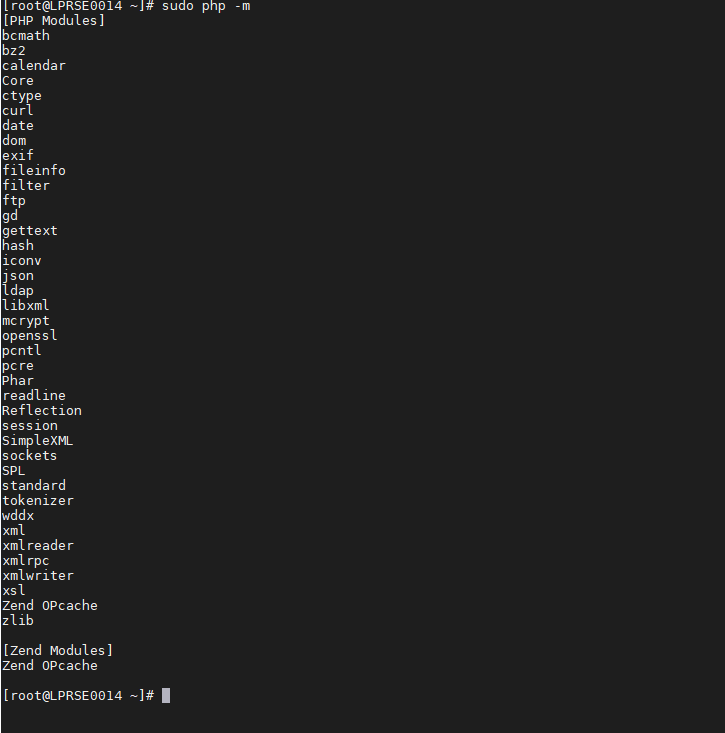
Maybe the php-mysql module is not installed or loaded. Can you list your installed modules please?
This:
sudo php -mshould show all your installed modules.
Kind Regards,
Christian -
Hello ,
Thank you for replying
here is my modules installed
Waiting for responding
Thank you -
@creiss said in CMDB i-doit not running after updating PHP to 7.3:
php-mysql
Hello ,
My php version is :
PHP 7.3.18 (cli) (built: May 12 2020 08:04:33) ( NTS )
Copyright (c) 1997-2018 The PHP Group
Zend Engine v3.3.18, Copyright (c) 1998-2018 Zend Technologies
with Zend OPcache v7.3.18, Copyright (c) 1999-2018, by Zend TechnologiesBest Regards
-
Hello Again ,
I have installed all the required module for i-doit in previous comment , but the problem still resist ,
Any feedback ? .
Best Regard -
Hello ,
Any news ?
best Regards -
Hey @Le-Hatem
so you installed the correct extension but it still won't work? You can check your configuration file, located at
src/config.inc.php- there you might have to change'type' => 'mysql'to'type' => 'mysqli'.Best regards
-
@Le-Hatem said in CMDB i-doit not running after updating PHP to 7.3:
Any feedback ? .
Best RegardHello , Sorry for the late respond from me , another error is showing up :
Declaration of isys_module_manager::is_installed($p_identifier, $p_and_active = false) should be compatible with isys_module::is_installed($p_identifier = NULL) (/var/www/html/i-doit/src/classes/modules/manager/isys_module_manager.class.php:14)What i did ? i downloaded the version to 1.8,
i have updated the mariadb version to 10.1.45-MariaDB
php from 5.6 to 7.3.20
And the must important thing is that i dumped my database before doing that change ,
any suggestion ,?
should i modify the code or what should i do ? -
Hello @Le-Hatem,
which Version of i-doit do you use? 1.8?




Hello! It looks like you're interested in this conversation, but you don't have an account yet.
Getting fed up of having to scroll through the same posts each visit? When you register for an account, you'll always come back to exactly where you were before, and choose to be notified of new replies (either via email, or push notification). You'll also be able to save bookmarks and upvote posts to show your appreciation to other community members.
With your input, this post could be even better 💗
Register Login